
Payment Methods
MyBid operates on a prepayment basis for all Self-Service advertisers.
The available payment methods vary depending on the country associated with your account. Please note that certain options may be restricted due to regional regulations or provider limitations. You can view all currently available methods on the Top Up screen within your dashboard.
To add funds to your account, click the pink Add Funds button located in the top-right corner of the interface.
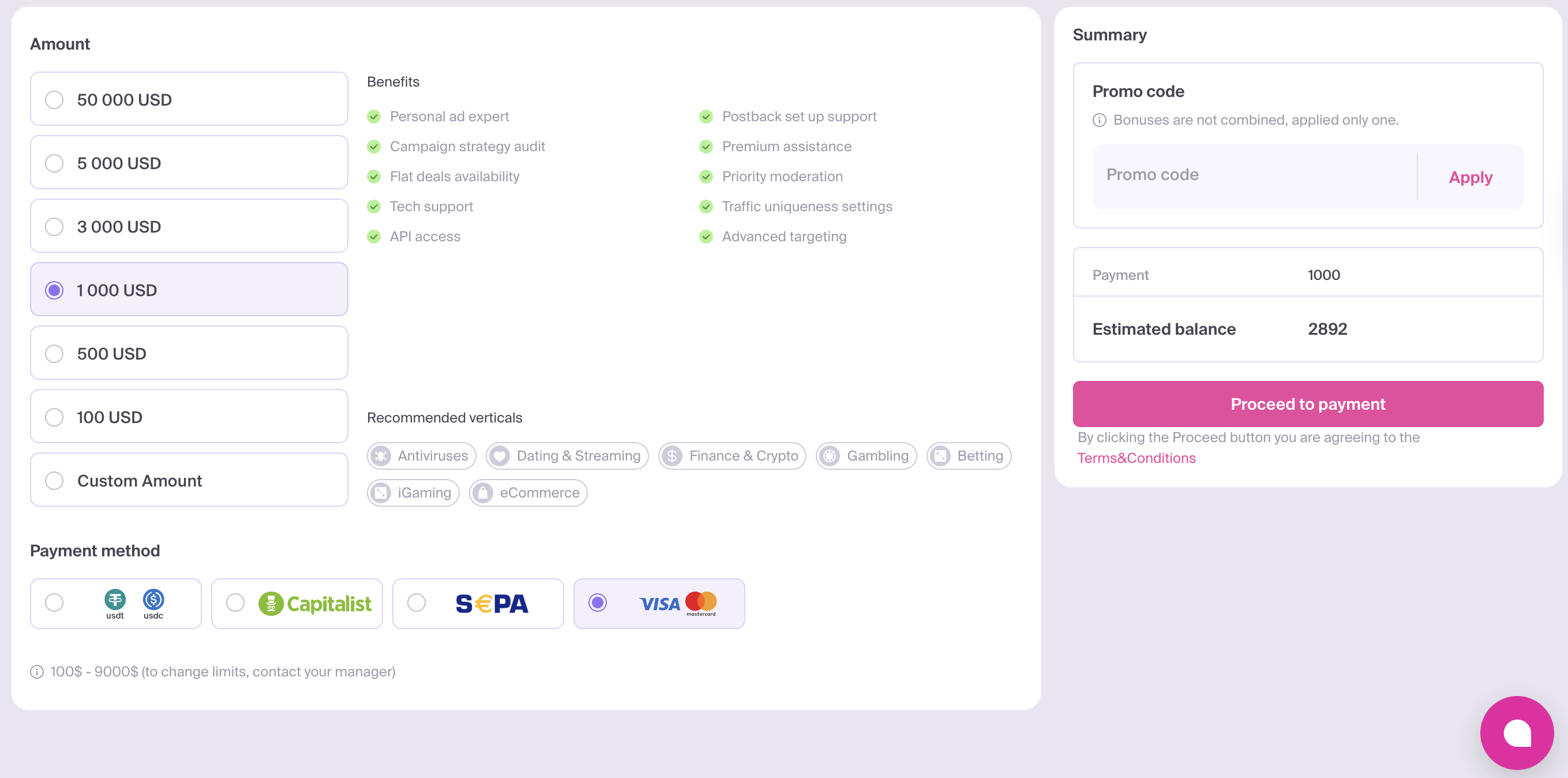
Supported Payment Methods:
- Bank Cards: Visa and MasterCard.
- Payment Services: Capitalist and Paxum.
- Bank Transfers: SEPA.
- Cryptocurrency: USDT and USDC.
The minimum deposit for Self-Service advertisers is 100 USD across all payment methods.
Promo Codes
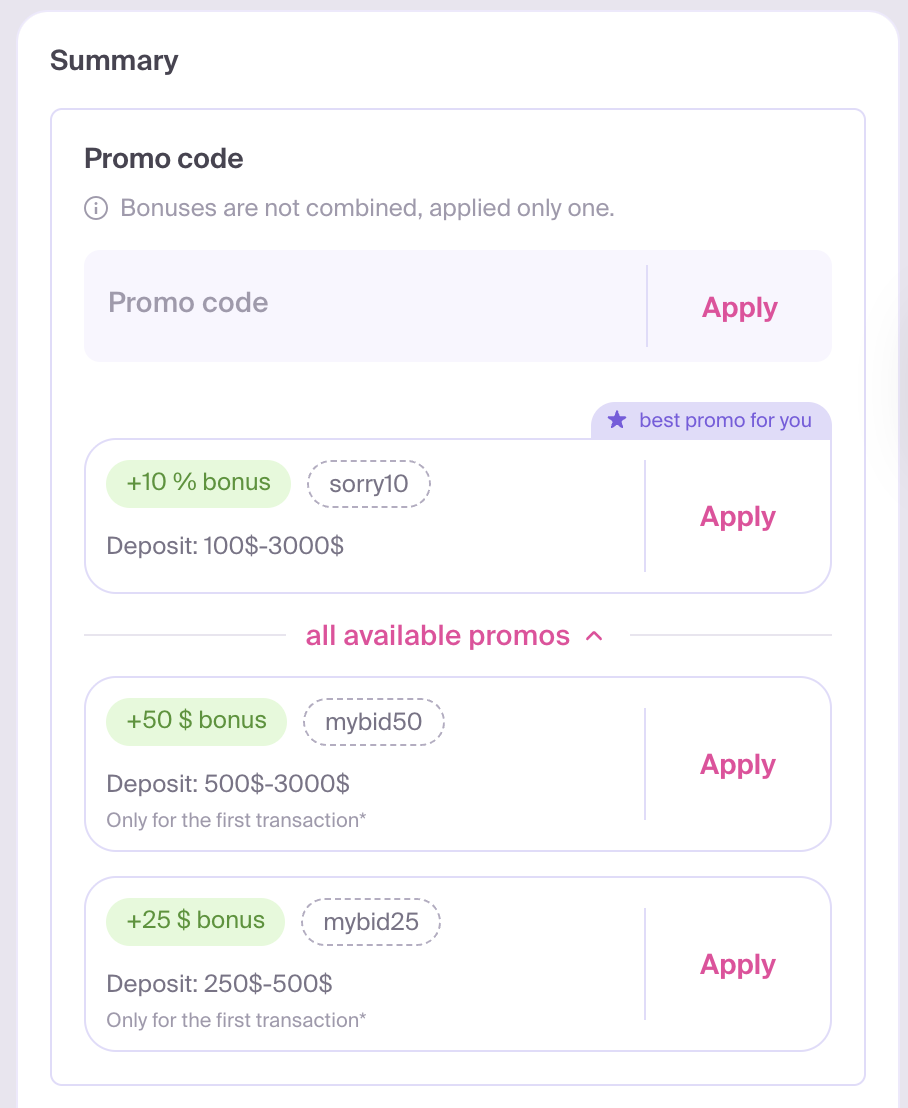
If you have a promo code, enter it in Promo code and click Apply. You can also apply an offer displayed in the same block. Only one bonus can be used at a time.
After applying a code or offer, check the top-up amount, bonus and Estimated balance in Summary before proceeding. Applying an offer may change the selected top-up amount. If the code is not accepted, follow the message shown below the field.
How to Add Funds
Via Capitalist
- Click Add Funds.
- Select Capitalist as your preferred payment method.
- Choose a preset amount or enter a custom value (minimum 100 USD).
- Enter your promo code and click Apply, if applicable.
- Click Proceed to payment to be redirected to the Capitalist secure payment gateway.
Via Paxum
- Open Top Up and select Paxum from the available payment methods.
- Enter the top-up amount within the limits shown on the page.
- Apply a promo code if you have one.
- Check Summary, including the 1% Paxum fee and Estimated balance.
- Click Proceed to payment and complete the payment on the payment page.
Via SEPA (Bank Transfer)
SEPA payments are processed in EUR, while your MyBid balance is credited in USD. Check the payment currency and amount before confirming the transfer.
- Click Add Funds.
- Select SEPA as your payment method.
- Choose a preset amount or enter a custom value (minimum 100 USD).
- Enter your promo code and click Apply, if applicable.
- Click Proceed to payment to receive the necessary transfer details or follow the on-screen instructions.
Via Bank Card (Visa/MasterCard)
- Click Add Funds.
- Select the payment option featuring the Visa and MasterCard logos.
- Choose a preset amount or enter a custom value (minimum 100 USD).
- Enter your promo code and click Apply, if applicable.
- Click Proceed to payment to enter your card details on our secure payment processor.
Via Cryptocurrency (USDT/USDC)
Click Add Funds.
Select the payment method featuring the USDT and USDC logos.
Choose a preset amount or enter a custom value (minimum 100 USD).
Select Currency, then choose one of the networks available for that currency in Network. Use the same currency and network when sending funds from your wallet or exchange.
Enter your promo code and click Apply, if applicable.
Click Request wallet to generate a unique destination address for your transaction.
Before sending funds
- Use the generated address for one transaction only. Request a new address for each subsequent top-up.
- Send at least 100 units of the selected currency: 100 USDT or 100 USDC. Deposits below this amount will not be credited.
- Do not send cryptocurrency to this address through Capitalist: these transfers are not supported and may result in loss of funds.
- Review all restrictions shown in the wallet dialog before making the transfer.
Copy the generated wallet address and complete the transfer from your external wallet or exchange.